LED
Just as printing “Hello, world!” is the first step in learning to program, using a program to drive an LED is the traditional introduction to learning physical programming.
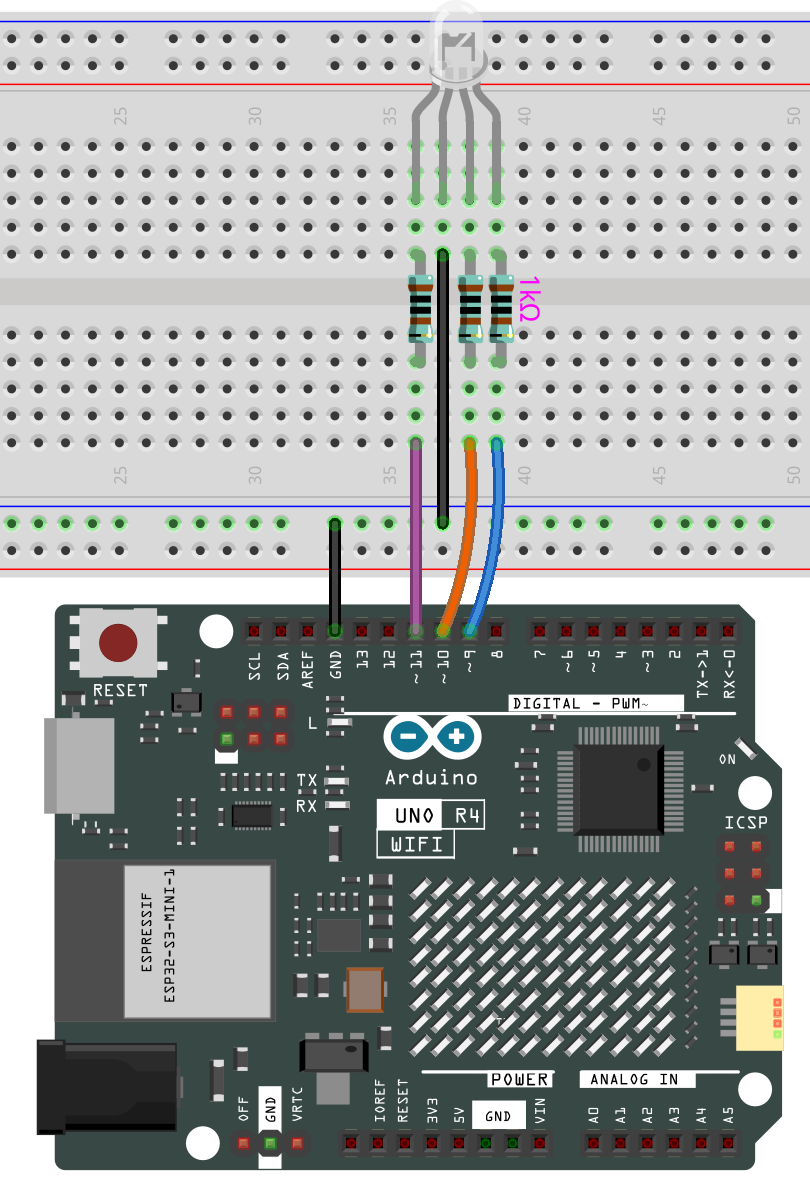
Wiring
Code
Note:
You can open the file
10-led.inounder the path ofBasic-Starter-Kit-for-Arduino-Uno-R4-WiFi-main\10-led.
Code Analysis
Here, we connect the LED to the digital pin 9, so we need to declare an int variable called ledpin at the beginning of the program and assign a value of 9.
constintledPin=9;
Now, initialize the pin in the setup() function, where you need to initialize the pin to OUTPUT mode.
voidsetup()
{
pinMode(ledPin,OUTPUT);
}
In loop(), digitalWrite() is used to provide 5V high level signal for ledpin, which will cause voltage difference between LED pins and light LED up.
digitalWrite(ledPin,HIGH);
If the level signal is changed to LOW, the ledPin’s signal will be returned to 0 V to turn LED off.
digitalWrite(ledPin,LOW);
An interval between on and off is required to allow people to see the change, so we use a delay(1000) code to let the controller do nothing for 1000 ms.
delay(1000);